# Playbook Worksheet

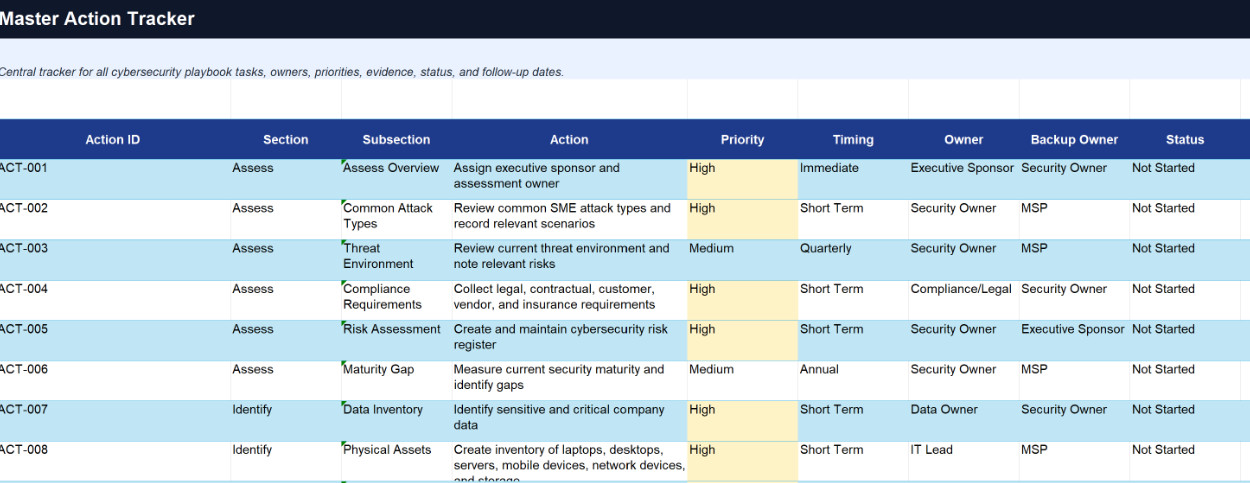
Consider creating or using our provided Master Action Playbook Worksheet to track your progress through the Playbook, available here:

# How to Use the Cybersecurity Playbook Workbook

This workbook is the practical companion to the cybersecurity playbook. Use it to organize ownership, track cybersecurity work, record evidence, manage incidents, and show leadership what still needs attention.

# 1. Establish the Foundation

Start by completing the worksheets that define what the company has, what matters, and who owns it.

Focus first on:

  • Cybersecurity Ownership Matrix
  • Risk Register
  • Compliance and Requirements Register
  • Data Inventory
  • Asset Inventory
  • Applications and Services Inventory
  • Users, Accounts, and Access Register
  • Vendor and Dependency Register

These worksheets help the company understand its risks, assets, systems, accounts, vendors, obligations, and responsibilities. This foundation should be reviewed regularly because cybersecurity work becomes unreliable when ownership, assets, accounts, or dependencies are unclear.

# 2. Manage the Work and Daily Security Operations

Use the Master Action Tracker as the main work queue for the full playbook.

Each action should have an owner, priority, due date, status, evidence requirement, evidence location, and verification method.

Use the operational worksheets to manage protection, detection, backup readiness, incident triage, evidence, communication, and recovery validation.

These worksheets help confirm that controls are being implemented, backups are tested, important systems are monitored, incidents can be handled in a controlled way, and recovery can happen safely.

# 3. Review, Improve, and Report Progress

Use the Review and Educate worksheets after incidents, near misses, exercises, major business changes, or scheduled reviews.

Record what happened, what worked, what failed, what must change, who owns the improvement, and when it is due.

Use the Dashboard and action trackers for leadership review. A practical rhythm is monthly for open actions and overdue items, quarterly for risks, controls, inventories, backups, detection, and training, and annually for a full workbook and playbook review.

# Objective

The workbook should help the company answer five questions:

  • What needs to be done?
  • Who owns it?
  • When is it due?
  • How will we prove it was done?
  • What risk remains?

# Sections of the Workbook Include:

# Worksheet Primary Playbook Section Also Supports Brief Description
1 Master Action Tracker All Sections Review, Governance Tracks all playbook tasks, improvement actions, owners, due dates, priority, status, evidence, and follow-up dates in one place.
2 Cybersecurity Ownership Matrix All Sections Assess, Respond, Recover, Educate Defines who owns key cybersecurity responsibilities, including risk, assets, access, backups, detection, response, recovery, vendors, training, and leadership approvals.
3 Risk Register Assess Protect, Review Records cybersecurity risks, likelihood, impact, affected assets, current controls, gaps, risk owner, treatment plan, and status.
4 Compliance and Requirements Register Assess Protect, Review Tracks legal, regulatory, contractual, cyber insurance, customer, vendor, and internal policy requirements that affect cybersecurity work.
5 Data Inventory Identify Protect, Recover, Review Lists important data types, where data is stored, who owns it, who can access it, how it is shared, retention needs, and protection requirements.
6 Asset Inventory Identify Protect, Detect, Recover Tracks physical and technical assets such as laptops, desktops, servers, mobile devices, network devices, storage devices, and assigned owners.
7 Applications and Services Inventory Identify Protect, Detect, Recover Lists internal applications, SaaS tools, websites, domains, hosting, cloud services, business owners, vendors, criticality, and login methods.
8 Users, Accounts, and Access Register Identify Protect, Respond, Review Tracks employees, admin accounts, shared accounts, service accounts, vendor accounts, MFA status, access levels, owners, and access review dates.
9 Vendor and Dependency Register Identify Protect, Respond, Recover Records MSPs, SaaS vendors, hosting providers, cloud services, payment processors, domain registrars, backup providers, and other critical dependencies.
10 Protection Controls Tracker Protect Assess, Review Tracks whether key safeguards are implemented, missing, partially implemented, tested, overdue, assigned, or accepted as residual risk.
11 Backup and Recovery Readiness Worksheet Protect Recover, Respond, Review Tracks backup coverage, frequency, retention, restore testing, backup owners, backup protection, failed-job alerts, recovery gaps, and readiness status.
12 Detection Coverage Register Detect Respond, Review Tracks which systems generate logs and alerts, where alerts go, who reviews them, review frequency, escalation rules, and detection gaps.
13 Incident Triage Worksheet Respond Detect, Review Helps classify suspected incidents by severity, scope, affected systems, affected accounts, affected data, active risk, evidence available, and next action.
14 Evidence and Communication Log Respond Recover, Review Records incident evidence, timestamps, screenshots, logs, communications, decisions, approvals, external contacts, and evidence storage locations.
15 Recovery Priority and Validation Worksheet Recover Identify, Respond, Review Defines which systems, data, users, vendors, and business processes must be restored first, then validates that recovery is safe and complete.
16 Post-Incident Review Worksheet Review Respond, Recover Reconstructs the incident timeline, key decisions, business impact, response performance, recovery performance, open questions, and lessons learned.
17 Improvement Action Tracker Review All Sections Converts findings into corrective actions with owners, due dates, priority, verification method, evidence, residual risk, and completion status.
18 Training Plan and Evidence Tracker Educate Review, Governance Tracks cybersecurity training topics, audiences, role-based training, completion status, simulations, tabletop exercises, evidence, metrics, and next due dates.